
Managed C++/CLI - Retrieve email from POP3 server
The following C++/CLI example codes demonstrate how to retrieve email from POP3 server. It downloads emails from POP3 server and deletes the email after the email is retrieved.
Sections:
Installation
Before you can use the following sample codes, you should download the EAGetMail Installer and install it on your machine at first. Full sample projects are included in this installer.
Install from NuGet
You can also install the run-time assembly by NuGet. Run the following command in the NuGet Package Manager Console:
Install-Package EAGetMail
Note
If you install it by NuGet, no sample projects are installed, only .NET assembly is installed.
Add reference
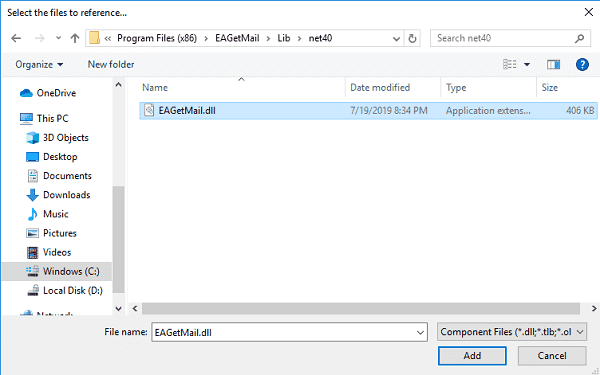
To use EAGetMail POP3 & IMAP Component in your project, the first step is “Add reference
of EAGetMail to your project”. Please create or open your project with Visual Studio,
then go to menu -> Project -> Add Reference -> .NET -> Browse..., and
select Installation path\Lib\[netversion]\EAGetMail.dll, click Open-> OK, the reference
will be added to the project, you can start to use it to
retrieve email and parse email in your project.
.NET assembly
Because EAGetMail has separate builds for .Net Framework, please refer to the following table and choose the correct dll.
Separate builds of run-time assembly for .Net Framework 2.0, 4.0, 4.5, 4.6.1, 4.7.2, 4.8.1, .NET 6.0, NET 7.0, .NET 8.0, .NET Standard 2.0 and .Net Compact Framework 2.0, 3.5.
| File | .NET Framework Version |
| Lib\net20\EAGetMail.dll |
Built with .NET Framework 2.0
It requires .NET Framework 2.0, 3.5 or later version. |
| Lib\net40\EAGetMail.dll |
Built with .NET Framework 4.0
It requires .NET Framework 4.0 or later version. |
| Lib\net45\EAGetMail.dll |
Built with .NET Framework 4.5
It requires .NET Framework 4.5 or later version. |
| Lib\net461\EAGetMail.dll |
Built with .NET Framework 4.6.1
It requires .NET Framework 4.6.1 or later version. |
| Lib\net472\EAGetMail.dll |
Built with .NET Framework 4.7.2
It requires .NET Framework 4.7.2 or later version. |
| Lib\net481\EAGetMail.dll |
Built with .NET Framework 4.8.1
It requires .NET Framework 4.8.1 or later version. |
| Lib\net6.0\EAGetMail.dll |
Built with .NET 6.0
It requires .NET 6.0 or later version. |
| Lib\net7.0\EAGetMail.dll |
Built with .NET 7.0
It requires .NET 7.0 or later version. |
| Lib\net8.0\EAGetMail.dll |
Built with .NET 8.0
It requires .NET 8.0 or later version. |
| Lib\netstandard2.0\EAGetMail.dll |
Built with .NET Standard 2.0
It requires .NET Standard 2.0 or later version. |
| Lib\net20-cf\EAGetMail.dll |
Built with .NET Compact Framework 2.0
It requires .NET Compact Framework 2.0, 3.5 or later version. |
| Lib\net35-cf\EAGetMail.dll |
Built with .NET Compact Framework 3.5
It requires .NET Compact Framework 3.5 or later version. |
Managed C++/CLI - Retrieve email from POP3 server - example
The following example codes demonstrate retrieving email from POP3 server.
In order to run it correctly, please change email server, user, password, folder, file name value to yours.
Note
To get full sample projects, please download and install EAGetMail on your machine.
#include "stdafx.h"

using namespace System;
using namespace System::Globalization;
using namespace System::IO;
using namespace EAGetMail; //add EAGetMail namespace

// Generate an unqiue email file name based on date time
static String ^ _generateFileName(int sequence)
{
    DateTime currentDateTime = DateTime::Now;
    return String::Format("{0}-{1:000}-{2:000}.eml",
        currentDateTime.ToString("yyyyMMddHHmmss", gcnew CultureInfo("en-US")),
        currentDateTime.Millisecond,
        sequence);
}

int main(array<System::String ^> ^args)
{
    try
    {
        // Create a folder named "inbox" under current directory
        // to save the email retrieved.
        String ^localInbox = String::Format("{0}\\inbox", Directory::GetCurrentDirectory());

        // If the folder is not existed, create it.
        if (!Directory::Exists(localInbox))
        {
            Directory::CreateDirectory(localInbox);
        }

        MailServer ^oServer = gcnew MailServer("pop3.emailarchitect.net",
            "test@emailarchitect.net",
            "testpassword",
            ServerProtocol::Pop3);

        oServer->Port = 110;

        // If your POP3 server requires SSL connection,
        // Please add the following codes:
        // oServer->SSLConnection = true;
        // oServer->Port = 995;

        Console::WriteLine("Connecting server ...");

        MailClient ^oClient = gcnew MailClient("TryIt");
        oClient->Connect(oServer);

        array<MailInfo^> ^infos = oClient->GetMailInfos();
        Console::WriteLine("Total {0} email(s)\r\n", infos->Length);

        for (int i = 0; i < infos->Length; i++)
        {
            MailInfo ^info = infos[i];
            Console::WriteLine("Index: {0}; Size: {1}; UIDL: {2}",
                info->Index, info->Size, info->UIDL);

            // Generate an unqiue email file name based on date time
            String^ fileName = _generateFileName(i + 1);
            String^ fullPath = String::Format("{0}\\{1}", localInbox, fileName);

            // Receive email from POP3 server
            Mail ^oMail = oClient->GetMail(info);
            Console::WriteLine("From: {0}", oMail->From->ToString());
            Console::WriteLine("Subject: {0}\r\n", oMail->Subject);

            // Save email to local disk
            oMail->SaveAs(fullPath, true);

            // Mark email as deleted from POP3 server.
            oClient->Delete(info);
        }

        // Quit and expunge emails marked as deleted from POP3 server.
        oClient->Quit();
        Console::WriteLine("Completed!");
    }
    catch (Exception ^ep)
    {
        Console::WriteLine(ep->Message);
    }

    return 0;
}
Appendix
- Retrieve email and parse email in Managed C++/CLI - Tutorial
- EAGetMail POP3/IMAP4 Component SDK
- Using UIDLManager to mark email as read/downloaded
- Download only unread/new emails from IMAP or MS Exchange Server
- Search emails and filter emails on IMAP or MS Exchange Server
- Retrieve emails from specified folder in IMAP or MS Exchange Server
Comments
If you have any comments or questions about above example codes, please click here to add your comments.