
VB6 - Send email using MX DNS lookup - smart host
The following vb6 example codes demonstrate how to send email without specified SMTP server.
How does it work?
In general, we send email via specified SMTP server. How does the specified SMTP server know what address this email should be sent to? The answer is… it queries MX record of recipient’s domain via DNS lookup. It then forwards this email to the SMTP server queried from DNS server. If recipient’s server doesn’t work fine, sender’s SMTP server will send a failure-delivery report to the sender telling it failed to send out the email.
How does EASendMail SMTP component work with “Send email directly”? Firstly, it queries MX record for recipient address from DNS, then sends email to recipient’s email server directly. In short, if no SMTP server is specified in the code, EASendMail will send email to recipient directly. Since querying DNS server consumes CPU time and networking resource, the performance of “Send email directly” is lower than sending email with specified SMTP server. Moreover, nowadays more and more SMTP servers block email sent from dynamic IP address, so we don’t recommend you to use “Direct Send Email” except you have a static IP address or you encounter problem with your ISP SMTP server.
Every recipient may have different SMTP server, if there are multiple recipients in one message and you want to send email directly, you should send the email to the recipients one by one.
To implement this feature, you just need to put nothing to SMTP server address.
Sections:
Installation
EASendMail is a SMTP component which supports all operations of SMTP/ESMTP protocols (RFC 821, RFC 822, RFC 2554). Before you can use the following example codes, you should download the EASendMail Installer and install it on your machine at first.
Add reference in VB6
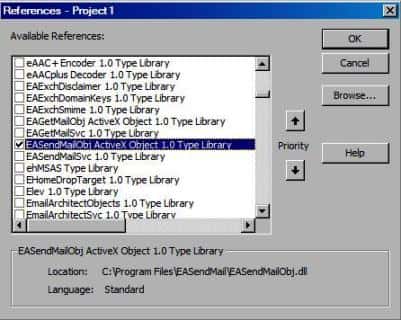
To use EASendMail SMTP ActiveX Object in your project, the first step is “Add reference
of EASendMail to your project”. Please select menu -> Project -> References ->
and select EASendMailObj ActiveX Object, click OK, the reference will be added
to current project, and you can start to use it to send email in your VB6 project.
Add reference in VBA (EXCEL/Access/Outlook)
Open VBA IDE by press Alt+F11, Please select menu -> Tools -> References -> and select EASendMailObj ActiveX Object,
click OK, the reference will be added to current VBA project, and you can start to use it to send email in your VBA project.
VB6 - Send email using MX DNS lookup - smart host - example
The following example codes demonstrate sending email message using MX DNS lookup.
In order to run it correctly, please change SMTP server, user, password, sender, recipient value to yours.
Note
To get full sample projects, please download and install EASendMail on your machine.
Private Sub btnSendMail_Click()

    Dim oSmtp As New EASendMailObjLib.Mail
    oSmtp.LicenseCode = "TryIt"

    ' Set your sender email address
    oSmtp.FromAddr = "test@emailarchitect.net"

    ' Add recipient email address
    oSmtp.AddRecipientEx "support@emailarchitect.net", 0

    ' Set email subject
    oSmtp.Subject = "simple email from VB 6.0 project"

    ' Set email body
    oSmtp.BodyText = "this is a test email sent from VB 6.0 project, do not reply"

    ' Do not set SMTP server address
    oSmtp.ServerAddr = ""

    MsgBox "start to send email ..."

    If oSmtp.SendMail() = 0 Then
        MsgBox "email was sent successfully!"
    Else
        MsgBox "failed to send email with the following error:" & oSmtp.GetLastErrDescription()
    End If

End Sub
With above code, if you get error like “5xx IP address rejected”, that means your IP address is blocked by the recipient’s SMTP server. You have to specify a SMTP server with user authentication to relay your email.
Important notice
If your machine doesn’t have a static IP address, then I don’t suggest that you send email directly.
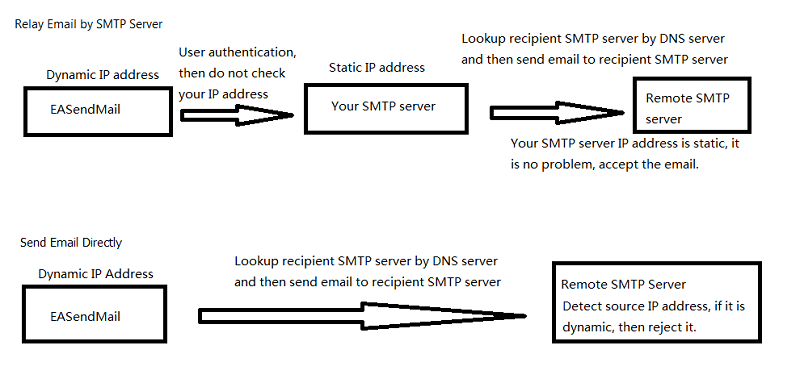
- If your IP address is dynamic, most SMTP servers reject your connection due to anti-spam policy. We always suggest that your send email by a SMTP server that has a static internet IP address. When you relay email by your SMTP server, because you do user authentication at first before you send email to your SMTP server, so your SMTP server doesn’t reject your connection even your IP address is dynamic. Finally your SMTP server sends email to remote SMTP server. Because your SMTP server has a static IP, the email won’t be rejected by remote SMTP server.
- If you encountered a temporal SMTP error (4xx), you should retry to send email later. That means you have to write the code to handle retry. So if you have a static IP address, I suggest that you use EASendMail Component + EASendMail Service, EASendMail service can send email directly or send email with specified SMTP server in background and handle delivery retry automatically.
To learn more detail about EASendMail Serivce, please have a look at Work with EASendMail Service (Email Queuing).
TLS 1.2 protocol
TLS is the successor of SSL, more and more SMTP servers require TLS 1.2 encryption now.
If your operating system is Windows XP/Vista/Windows 7/Windows 2003/2008/2008 R2/2012/2012 R2, you need to
enable TLS 1.2 protocol in your operating system like this:
Enable TLS 1.2 on Windows XP/Vista/7/10/Windows 2008/2008 R2/2012
32bit/x64 ActiveX DLL
Seperate builds of run-time dll for 32 and x64 platform
| File | Platform |
| Installation Path\Lib\native\x86\EASendMailObj.dll | 32 bit |
| Installation Path\Lib\native\x64\EASendMailObj.dll | 64 bit |
Distribution
Standard EXE
For VB6, C++, Delphi or other standard exe application, you can distribute EASendMailObj.dll with your application to target machine without COM-registration and installer. To learn more detail, please have a look at Registration-free COM with Manifest File.
Script
For ASP, VBScript, VBA, MS SQL Stored Procedure, you need to install EASendMail on target machine by EASendMail installer, both 32bit/x64 DLL are installed and registered.
Appendix
- Send Email in VB 6.0 - Tutorial
- EASendMail SMTP Component SDK
- Process Bounced Email (Non-Delivery Report) and Email Tracking
- Bulk Email Sender Guidelines
- Work with Email Queue
Comments
If you have any comments or questions about above example codes, please click here to add your comments.