
Filters and Message Approval
Message Filters enable system/domain administrators/users to perform the customized task such as forward, copy, delete, move, bounce and approve message. This is a very important feature of EmailArchitect Email Server. EmailArchitect Email Server provides the following filters:
Global Filters
It takes effect to every incoming message arrived at SMTP service or every outgoing message was sent by SMTP service. Only "system" can manage it.
Domain Filters
It takes effect to every incoming message arrived to a specific domain or every outgoing message from a specific domain. Only "domain administrator" can manage it.
User Filters
It takes effect to an incoming message is ready to be stored in user INBOX.
Wildcard(*,?), Regular Expression and Advanced Functions
In filter conditions, both of wildcard(*,?) and regular expression are supported. To help user to set some special conditions for the rule, EmailArchitect Email Server provides a lot of Advanced Functions. For example, function "{$fn_from_autheduser:true}" can be used to detect if the email was sent by authenicated user.
Message Approval
Message Approval is an unique feature of EmailArchitect Server. This function is very useful to administrator. For example, the administrator set this rule in domain filter:
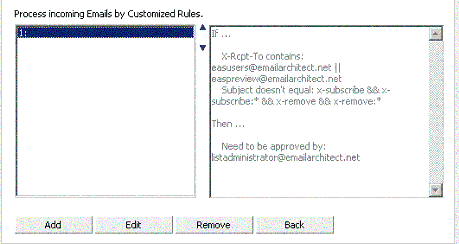
Once the message matches the rule, the message will be sent to approver e-mail address. Approver MUST be a local user of current EmailArchitect Email Server, and he/she MUST logon the Web Mail to "approve" or reject this message instead of download the message to email client. If the message is approved, Emailarchitect Email Server will deliver the message to original recipients.
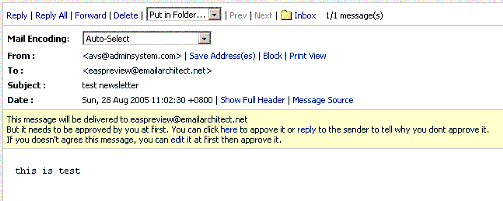
The "Message Approval" function is also useful to a company or a CRM system. For example: I am a support team leader, and there are three members in my team. They need to reply the emails to clients every day. But before the email was sent, I want to check and edit the emails sent by the members of my team to make sure there is no error in the email content, so I use the "Message Approval" function.