
Delphi - Parse failure delivery report (NDS)
The following delphi example codes demonstrate how to parse failure delivery report.
Read receipt
Some e-mail applications, such as Microsoft Office Outlook, employ a read-receipt tracking mechanism. A sender selects the receipt request option prior to sending the message. Upon opening the email, each recipient has the option of notifying the sender that the message was opened and read.
However, there is no guarantee that you will get a read-receipt. Some possible reason are that very few e-mail applications or services support read receipts, or simply because users disable the functionality. Those do support read-receipt aren’t necessarily compatible with or capable of recognizing requests from a different e-mail service or application
Delivery receipt and failure report
It is also called a DSN (delivery service notification), which is a request to the recipient’s email server to send you a notification about the delivery of an email you’ve just sent. The notification takes the form of an email, and will tell you if your delivery succeeded (Delivery Receipt), failed, got delayed (Failure Report).
Parse report
For many email campaign applications, the very important task is detecting if the email is received by recipient or not. Parsing the delivery report is the common way to get the email status. EAGetMail .NET class provides a built-in function (GetReport) to parse the report. The following sample demonstrates how to parse the delivery-report.
If ReporType is DeliveryReceipt or ReadReceipt, the report probably has only OriginalSender, OriginalRecipient and OriginalMessageID information in the report, it depends on the mail server that generated the report.
Installation
Before you can use the following sample codes, you should download the EAGetMail Installer and install it on your machine at first. Full sample projects are included in this installer.
Add reference
To better demonstrate how to retrieve email and parse email, let’s create a Delphi Standard EXE project at first, then add a TButton on the Form, double-click this button. It is like this:
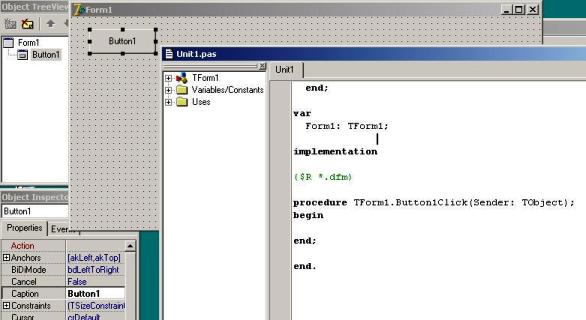
To use EAGetMail ActiveX Object in your Delphi project, the first step is “Add Unit file of EAGetMail to your project”. Please go to
C:\Program Files\EAGetMail\Include\delphi or
C:\Program Files (x86)\EAGetMail\Include\delphi folder,
find EAGetMailObjLib_TLB.pas, and then copy this file to your project folder.
// include EAGetMailObjLib_TLB unit to your Delphi Project
unit Unit1;

interface

uses
Windows, Messages, SysUtils, Variants, Classes, Graphics, Controls, Forms,
Dialogs, EAGetMailObjLib_TLB, StdCtrls;
Then you can start to use it in your Delphi Project.
You can also create EAGetMailObjLib_TLB.pas manually by Delphi like this:
Delphi 7 or eariler version
First of all, create a standard delphi project: select menu
Project->Import Type Library, checkedEAGetMail ActiveX Objectand clickCreate Unit. Then includeEAGetMailObjLib_TLBin your project.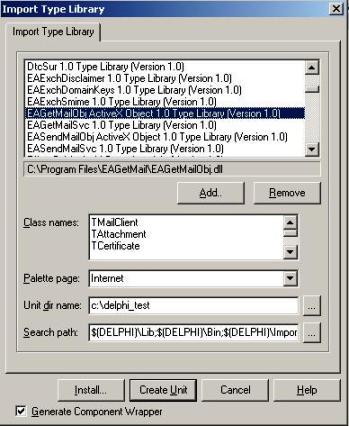
Delphi XE or later version
First of all, create a standard delphi project: select menu
Component->Import component...->Import a type library-> checkedEAGetMail ActiveX Object, haveGenerate Component Wrapperchecked and click “Create Unit”. Then includeEAGetMailObjLib_TLBin your project.
Delphi - Parse failure delivery report (NDS) - example
The following example codes demonstrate parsing failure delivery report.
In order to run it correctly, please change email server, user, password, folder, file name value to yours.
Note
To get full sample projects, please download and install EAGetMail on your machine.
unit Unit1;

interface

uses
    Windows, Messages, SysUtils, Variants, Classes, Graphics, Controls, Forms,
    Dialogs, StdCtrls, EAGetMailObjLib_TLB;

type
    TForm1 = class(TForm)
        Button1: TButton;
        procedure Button1Click(Sender: TObject);
    private
        { Private declarations }
        procedure ParseReport(fileName: WideString);
    public
        { Public declarations }
    end;

const
    // Report Type
    FailureReport = 0;
    DeliveryReceipt = 1;
    ReadReceipt = 2;
    Receipt_Deleted = 3;
    DelayedReport = 4;

var
    Form1: TForm1;

Implementation

{$R *.dfm}

procedure TForm1.ParseReport(fileName: WideString);
var
    oMail: TMail;
    oReport: IMailReport;
    oHeaders: IHeaderCollection;
    i: Integer;
begin
    oMail := TMail.Create(Application);
    oMail.LicenseCode := 'TryIt';

    oMail.LoadFile(fileName, false);

    if not oMail.IsReport then
        begin
            ShowMessage('This is not a report!');
            exit;
        end;

    oReport := oMail.GetReport();
    if oReport.ReportType = DeliveryReceipt then
        ShowMessage('This is a deliver receipt!')
    else if oReport.ReportType = ReadReceipt Then
        ShowMessage('This is a read receipt!')
    else if oReport.ReportType = Receipt_Deleted then
        ShowMessage('This is a unread receipt, this email was deleted without read!')
    else if oReport.ReportType = DelayedReport then
        ShowMessage('This is a delayed report, this email will be tried later!')
    else
        ShowMessage('This is a failure report!');

    // Get original message information
    ShowMessage(oReport.OriginalSender);
    ShowMessage(oReport.OriginalRecipient);
    ShowMessage(oReport.OriginalMessageID);

    if (oReport.ReportType = FailureReport) or (oReport.ReportType = DelayedReport) then
        begin
            ShowMessage(oReport.ErrCode);
            ShowMessage(oReport.ErrDescription);
            ShowMessage(oReport.OriginalSubject);
            ShowMessage(oReport.ReportMTA);
            oHeaders := oReport.OriginalHeaders;
            // Parse original email headers.
            for i := 0 to oHeaders.Count - 1 do
                begin
                    ShowMessage(oHeaders.Item(i).HeaderKey + ':' +
                        oHeaders.Item(i).HeaderValue);
                end;
        end;

end;

procedure TForm1.Button1Click(Sender: TObject);
begin
    try
        ParseReport('c:\my folder\test.eml');
    except
        on ep:Exception do
            ShowMessage('Error: ' + ep.Message);
    end;

end;

end.
32bit/x64 ActiveX DLL
Seperate builds of run-time dll for 32 and x64 platform
| File | Platform |
| Installation Path\Lib\native\x86\EAGetMailObj.dll | 32 bit |
| Installation Path\Lib\native\x64\EAGetMailObj.dll | 64 bit |
Distribution
Standard EXE
For VB6, C++, Delphi or other standard exe application, you can distribute EAGetMailObj.dll with your application to target machine without COM-registration and installer. To learn more detail, please have a look at Registration-free COM with Manifest File.
Script
For ASP, VBScript, VBA, MS SQL Stored Procedure, you need to install EAGetMail on target machine by EAGetMail installer, both 32bit/x64 DLL are installed and registered.
Appendix
- Retrieve email and parse email in Delphi - Tutorial
- EAGetMail POP3/IMAP4 Component SDK
- Using UIDLManager to mark email as read/downloaded
- Download only unread/new emails from IMAP or MS Exchange Server
- Search emails and filter emails on IMAP or MS Exchange Server
- Retrieve emails from specified folder in IMAP or MS Exchange Server
Comments
If you have any comments or questions about above example codes, please click here to add your comments.